How to use the Prizeout POS
If your business doesn't currently have any Gift Cards, that’s no issue, Prizeout can provide you with Gift Card inventory through our Merchant Portal.
To learn how to setup your Prizeout provided Gift Card inventory, please click here.
How to Process a Prizeout Gift Card Payment In Store:
Step 1: Navigate to the Prizeout POS on any Internet enabled device at pos.prizeout.com
Step 2: Enter your Store ID and click Enter
Please Note: Your Store ID number is a 6-digit code that can be found in your Merchant Portal

Step 3: Scan your customer’s QR code to auto-populate the Gift Card Code and PIN number. Or, you can manually enter the Gift Card Code and PIN into the required fields.
Please Note: The Gift Card Code, PIN, and QR code can all be found in the Prizeout email that the customer received. Gift Card Code is case sensitive. 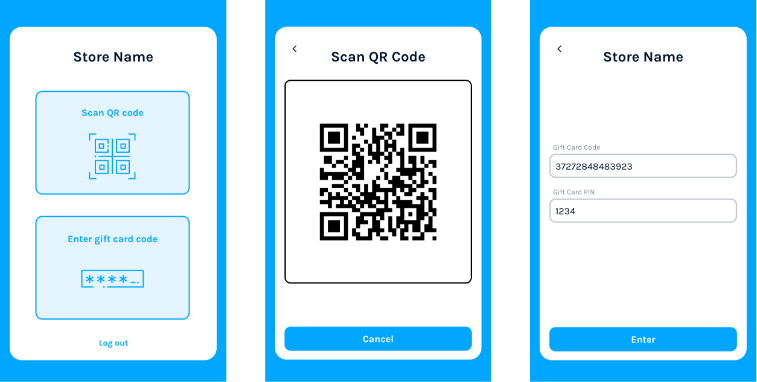
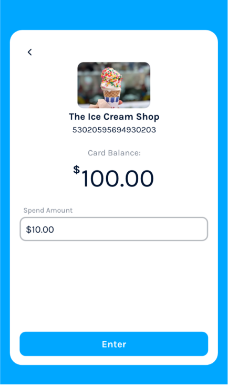
Step 4: Enter the amount that the customer is spending.
Step 5: Enter your Merchant PIN number and double check the spend amount of your customer. Click
Enter once everything is all set. A receipt will be automatically emailed to your customer.
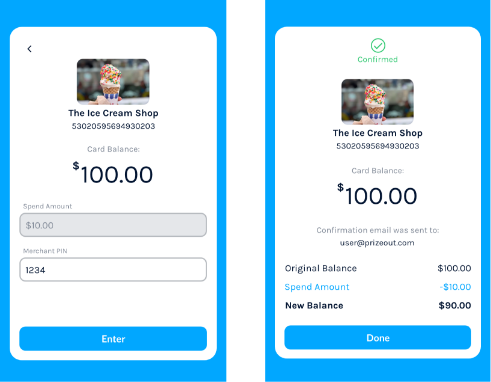
Step 6: Once completed your admin email address will receive a receipt for each transaction. The email
will include: